
BZU Multan Student Community


HOME BZU Mail Box Online Games Radio and TV Cricket All Albums
Go Back   BZU PAGES: Find Presentations, Reports, Student's Assignments and Daily Discussion; Bahauddin Zakariya University Multan > Welcome to all the Students > Tutorial > PC and Windows Tutorial

Ad

Reply
 
Thread Tools Search this Thread Rating: Thread Rating: 4 votes, 3.50 average. Display Modes
Old 09-10-2007, 04:38 PM   #1
Your Friendly Admin
Innocent Baby
BSIT Professional


.BZU.'s Avatar
 
Join Date: Sep 2007


Location: near Govt College of Science Multan Pakistan
Posts: 9,487
Thanks: 2,310
Thanked 2,182 Times in 1,782 Posts
Contact Number: Removed
Program / Discipline: BSIT
Class Roll Number: 07-15
.BZU. has a reputation beyond repute.BZU. has a reputation beyond repute.BZU. has a reputation beyond repute.BZU. has a reputation beyond repute.BZU. has a reputation beyond repute.BZU. has a reputation beyond repute.BZU. has a reputation beyond repute.BZU. has a reputation beyond repute.BZU. has a reputation beyond repute.BZU. has a reputation beyond repute.BZU. has a reputation beyond repute
Time Spent Online: 3 Months 3 Weeks 3 Days 10 Hours 48 Minutes 53 Seconds
BZU logo (How to capture images by print screen Button)

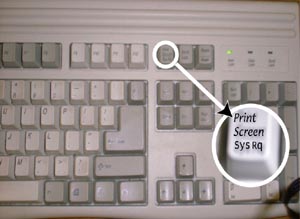
Print Screen Button Tutorial
1,In order to use Print Screen Button, first push Print Screen button to save desired screen.
2,Next, open up Microsoft Paint.
3,Go to Edit and hit Paste at center of screen.
4, Or RIGHT click mouse button and go to Paste.
5, Or hit and hold CONTROL button and hit the V button
Save picture
Name:  keybrd.jpg
Views: 1908
Size:  19.7 KB

By using this method I have captured the BZU logo from the bzu.edu.pk and submiting here,..Because some friends dont know about this and they are saving the logo by click on save picture as..But in BZU.edu.pk The logo is divided into two parts...

Name:  logo btmp.bmp
Views: 2807
Size:  90.2 KB
Advertisement
Views: 6693
Attached Images
   
__________________
(¯`v´¯)
`*.¸.*`

¸.*´¸.*´¨) ¸.*´¨)
(¸.*´ (¸.
Bzu Forum

Don't cry because it's over, smile because it happened
.BZU. is offline  
Reply With Quote
Top 10 Lists

Old 14-10-2007, 03:01 AM   #2
mee
Toddler

 
mee's Avatar
 
Join Date: Oct 2007


Posts: 11
Thanks: 0
Thanked 2 Times in 2 Posts
Program / Discipline: Engineering
mee is on a distinguished road
Time Spent Online: 1 Hour 35 Minutes 37 Seconds
Default

Good Job meri jaan
mee is offline   Reply With Quote
Old 03-04-2008, 02:22 PM   #3
Addicted to Computer


BSIT07-01's Avatar
 
Join Date: Sep 2007


Location: ------------
Age: 22
Posts: 1,339
Thanks: 597
Thanked 357 Times in 288 Posts
Contact Number: ---------------
Program / Discipline: BSIT
Class Roll Number: 07-01
BSIT07-01 has a brilliant futureBSIT07-01 has a brilliant futureBSIT07-01 has a brilliant futureBSIT07-01 has a brilliant futureBSIT07-01 has a brilliant futureBSIT07-01 has a brilliant futureBSIT07-01 has a brilliant futureBSIT07-01 has a brilliant futureBSIT07-01 has a brilliant futureBSIT07-01 has a brilliant futureBSIT07-01 has a brilliant future
Time Spent Online: 1 Month 3 Days 9 Hours 5 Minutes 20 Seconds
Default Re: BZU logo (How to capture images by print screen Button)

Check these large logos...

BMP
Name:  logo.bmp
Views: 1927
Size:  91.3 KB

JPG
Name:  LOGO.jpg
Views: 1740
Size:  9.2 KB
BSIT07-01 is offline   Reply With Quote
Old 27-05-2011, 12:41 AM   #4
Your Friendly Admin
Innocent Baby
BSIT Professional


.BZU.'s Avatar
 
Join Date: Sep 2007


Location: near Govt College of Science Multan Pakistan
Posts: 9,487
Thanks: 2,310
Thanked 2,182 Times in 1,782 Posts
Contact Number: Removed
Program / Discipline: BSIT
Class Roll Number: 07-15
.BZU. has a reputation beyond repute.BZU. has a reputation beyond repute.BZU. has a reputation beyond repute.BZU. has a reputation beyond repute.BZU. has a reputation beyond repute.BZU. has a reputation beyond repute.BZU. has a reputation beyond repute.BZU. has a reputation beyond repute.BZU. has a reputation beyond repute.BZU. has a reputation beyond repute.BZU. has a reputation beyond repute
Time Spent Online: 3 Months 3 Weeks 3 Days 10 Hours 48 Minutes 53 Seconds
Default Re: BZU logo (How to capture images by print screen Button)

Name:  bzu logo.jpg
Views: 828
Size:  106.5 KB

latest big big
__________________
(¯`v´¯)
`*.¸.*`

¸.*´¸.*´¨) ¸.*´¨)
(¸.*´ (¸.
Bzu Forum

Don't cry because it's over, smile because it happened
.BZU. is offline   Reply With Quote
Reply

Tags
button, bzu, capture, images, logo, print, screen, tutorial


Currently Active Users Viewing This Thread: 1 (0 members and 1 guests)
 
Thread Tools Search this Thread
Search this Thread:

Advanced Search
Display Modes Rate This Thread
Rate This Thread:

Posting Rules
You may not post new threads
You may not post replies
You may not post attachments
You may not edit your posts

BB code is On
Smilies are On
[IMG] code is On
HTML code is Off
Trackbacks are On
Pingbacks are On
Refbacks are On


Similar Threads
Thread Thread Starter Forum Replies Last Post
Press Button for Complaints... Raheel Funniest Pictures 0 17-06-2010 12:10 PM
Kristanix Button Shop 4.13 | 8.2MB .BZU. Download Free Software 0 27-12-2009 02:12 AM
Download SnagIt 8.2 Screen Capture Software .BZU. Downloads 4 25-09-2008 11:44 PM
FLV player Button in the Editor .BZU. Suggestion,Feedback and News about site 0 16-04-2008 08:43 PM

Best view in Firefox
Free File Hosting | Webmaster Forum | Cloud Computing | Dedicated server hosting
Note: This is an unofficial Site...
All trademarks and copyrights held by respective owners. We will take action against any copyright violation if it is proved to us.


Powered by vBulletin® Version 3.8.2
Copyright ©2000 - 2012, Jelsoft Enterprises Ltd.